
NetGuard
Screenshots
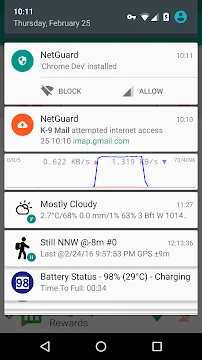
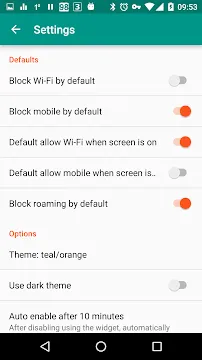
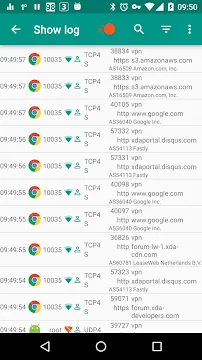
NetGuard provides a simple yet effective way to block internet access for specific applications. Most people do not realize how many apps constantly ping remote servers in the background. These hidden connections consume your battery and eat through your monthly data plan. By using this tool, you can regain control over your device without needing complex technical skills.
This application functions as a local VPN service. It does not send your traffic to a remote server. Instead, it filters all outgoing requests directly on your hardware. This method ensures that your sensitive information remains private. You can decide exactly which apps deserve to use your Wi-Fi or mobile data. If an app does not need the internet to function, you can simply cut its access.
Why NetGuard is Essential for Privacy
Many modern applications collect data about your habits and location. They often send this information to third-party advertisers without your explicit consent. NetGuard acts as a barrier between your personal data and these hungry servers. When you block an app, it stops tracking you in the background.
Privacy is not the only benefit here. Reducing background activity also improves your device’s overall speed. When fewer apps compete for bandwidth, your foreground tasks run much smoother. You will notice a significant decrease in lag during gaming or streaming. This tool helps you create a “lean” environment where only the apps you trust are allowed to communicate.
Mastering the Features of NetGuard
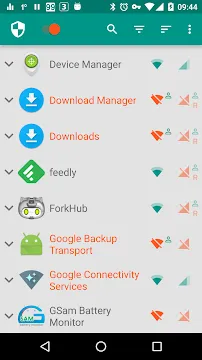
Setting up the app is straightforward and requires no “root” access. This is a major advantage because rooting often voids warranties and creates security holes. You simply flip a switch to enable the local VPN. Once active, a list of all installed applications appears on your screen.
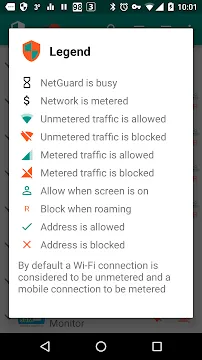
Next to each app, you will see two icons: one for Wi-Fi and one for mobile data. You can toggle these independently. For example, you might allow a high-definition video player to use Wi-Fi but block it on mobile data to save money. This granular control allows for a customized experience tailored to your lifestyle.
Key Features Include:
- No Root Required: Works on standard devices easily.
- Open Source: The code is transparent and auditable.
- Battery Friendly: It does not drain your power like traditional VPNs.
- IPv4 and IPv6 Support: Compatible with modern network protocols.
- Lightweight: The app occupies very little storage space.
How NetGuard Saves Your Battery and Data
Every time an app checks for an update or sends an ad request, it wakes up your processor. This “wake lock” is a primary cause of battery drain. Because NetGuard blocks these requests at the source, your phone stays in a deep sleep state longer. Users often report a noticeable increase in screen-on time after configuring their blocklist.
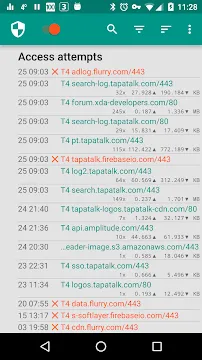
Data savings are equally impressive. Many free apps download heavy video ads in the background. By restricting these apps to Wi-Fi only, or blocking them entirely, you prevent unexpected overage charges. You can monitor exactly which apps are trying to connect through the notification log. This visibility helps you identify “data hogs” that you might want to uninstall.
Advanced Customization with NetGuard
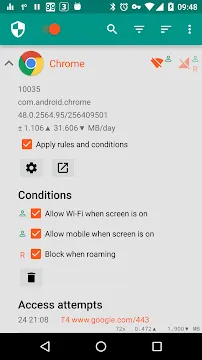
For those who want more than basic blocking, the app offers sophisticated settings. You can choose to block traffic only when the screen is off. This is perfect for messaging apps that you want to use while active but quiet while you sleep. Furthermore, you can allow system apps to bypass the filter to ensure your OS stays updated.
The interface is clean and avoids clutter. You can search for specific apps or filter the list by “allowed” or “blocked” status. If you encounter a problem with a specific service, the logs provide clear details on what was blocked and why. This transparency makes troubleshooting simple for everyone.
Advanced Options:
- Lockdown Mode: Block all traffic by default and only allow specific apps.
- Notification Alerts: Get notified when an app tries to access the web.
- Theme Support: Change the look of the interface to match your style.
- Export/Import: Save your settings and move them to a new device.
Enhancing Security with NetGuard Filters
Security threats often hide in plain sight. Malicious apps might try to communicate with a “command and control” server to steal your files. NetGuard prevents this by cutting off the communication lines. Even if a bad app is on your phone, it cannot do much damage if it cannot talk to the outside world.
The app supports custom firewall rules. You can block specific IP addresses or domain names rather than entire apps. This level of precision is usually reserved for desktop firewalls. Having this power on a mobile device gives you a professional-grade defense system against telemetry and unwanted scripts.
Conclusion
NetGuard is a must-have tool for anyone serious about mobile security. It bridges the gap between ease of use and powerful functionality. You do not need to be a programmer to block ads, save battery, or protect your data. By simply managing which apps can go online, you transform your smartphone into a more private and efficient device.
In a world where data is constantly being harvested, taking a stand is important. This application gives you the “off switch” that many developers try to hide. Whether you want to save money on your data plan or keep your location private, this tool provides the solution. Start managing your connections today and see the difference in your device’s performance.







